Long SAP Material Ledger closing runtimes can delay month-end reporting. Parallel processing in transaction CKMLCP can help reduce elapsed time when Actual Costing processes large volumes of materials, provided the workload and system resources are managed carefully.
 Understanding actual product costs is essential to profitability analysis. Standard prices provide a useful baseline during the period; SAP Actual Costing calculates actual material prices at period-end by taking relevant price differences and quantity flows into account.
The calculated periodic unit price (PUP) reflects eligible actual costs for the period. Depending on configuration, it can be used to revalue inventory and consumption at period-end.
In This Article
- How the Material Ledger Closing Cockpit Works
- Improve CKMLCP Performance With Parallel Processing
- Parallel Processing in SAP S/4HANA
- Material Ledger Performance Checklist
- Frequently Asked Questions
How the Material Ledger Closing Cockpit Works
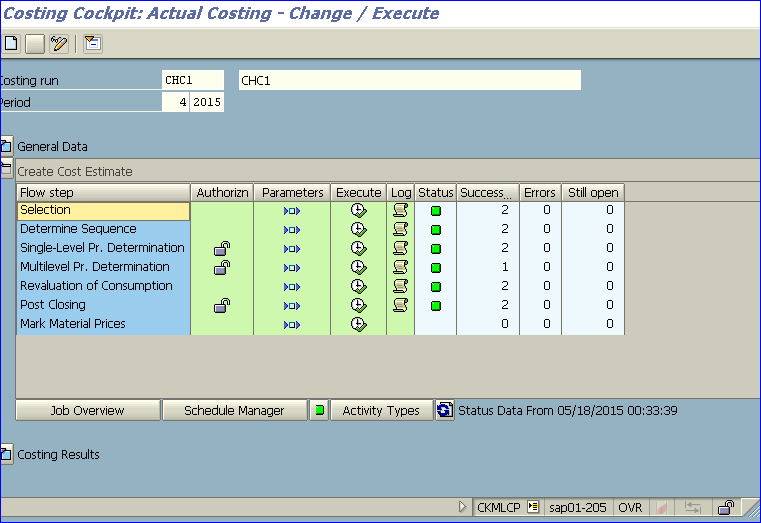
In SAP ERP (ECC), transaction CKMLCP organizes Actual Costing into a sequence of steps. Create the costing run for the relevant period and assign the participating plants. Figure 1 shows the classic Actual Costing cockpit and its sequence of closing steps.
Classic ECC Closing Steps
- Selection: identifies materials within the run scope.
- Sequence Determination: establishes the processing sequence based on material flows and dependencies.
- Single-Level Price Determination: calculates actual prices using relevant differences at the individual material level.
- Multilevel Price Determination: allocates relevant differences across the production and procurement chain.
- Revaluation of Consumption: calculates adjustments to eligible consumption based on configuration.
- Post Closing: posts applicable inventory and consumption revaluation entries.
- Mark Material Prices: optionally marks calculated prices for use in a future period, subject to the price update process.
In SAP S/4HANA, the redesigned Actual Costing run groups processing differently. Depending on the release and deployment, the cockpit includes Selection, Preparation, Settlement, Post Closing and Mark Prices. Do not assume the ECC step names apply unchanged to S/4HANA.
Improve CKMLCP Performance With Parallel Processing
Instead of processing all eligible work sequentially, the system can distribute packages to multiple parallel processes. For large runs, this may reduce elapsed time when sufficient application-server capacity is available. Figure 2 shows the parallel processing parameters in CKMLCP.
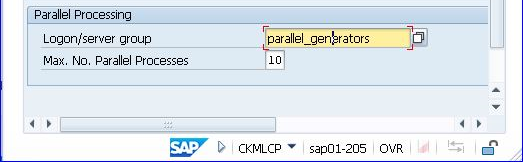
The classic example shows server group parallel_generators and a maximum of 10 parallel processes. This is a limit on concurrent processes, not a requirement for ten separate servers. Actual concurrency depends on available resources, server-group configuration and the workload.
Coordinate the settings with your SAP Basis team. Increasing the process count does not guarantee a proportional reduction in runtime; database contention, locks, package size and competing background jobs may limit the benefit.
Parallel Processing in SAP S/4HANA
In supported SAP S/4HANA releases, CKMLCP offers parallel processing for steps such as Preparation, Settlement and Post Closing. Where available, use the processing parameters and package size to adjust the distribution of materials or activities. Confirm the options in your release and deployment before changing production settings.
See SAP Help: Edit Actual Costing Runs for release-specific guidance.
Material Ledger Performance Checklist
- Establish baseline elapsed times and material counts for each closing step.
- Identify the longest-running steps and investigate job logs, errors and resource bottlenecks with Basis.
- Confirm upstream postings and settlements are complete before beginning Actual Costing.
- Test parallel processing with representative data and a conservative process count.
- Adjust package sizes and concurrency gradually, monitoring database and application-server load.
- Compare financial results and reconcile inventory and consumption postings before approving the new run settings.
Measure improvements against comparable periods rather than assuming a fixed percentage reduction. The goal is a faster, repeatable close without sacrificing accounting accuracy.
Frequently Asked Questions
Does Parallel Processing Change Actual Material Costs?
It is intended to improve processing efficiency, not change costing logic. Validate the results and reconcile postings when changing run settings.
Is Material Ledger the Same as Actual Costing?
No. Material Ledger supports material valuation and currencies, while Actual Costing is a separate capability that calculates periodic actual prices. See Introduction to SAP Material Ledger.
How Many Parallel Processes Should I Use?
There is no universal optimum. Work with Basis to test a process count appropriate to the available resources, data volume and close schedule.
Need Help With SAP Actual Costing?
ERPCorp specializes in SAP Product Costing, Material Ledger and Actual Costing. Get help analyzing closing runtimes, reconciling results and improving your period-end process.
Explore more insights from SAP experts through ERPCorp SAP Membership.